⚠️ Archived post. This article is from 2010 and is kept for historical reference. The product or service it describes has since been discontinued or significantly changed, so the steps and links below may no longer work.
I think most of you know that you can change the background image for your google homepage. for more information about that, you can refer to https://www.bustatech.com/google-background-image/.
 If you try to look carefully in the image above, you will notice that the Google logo is being changed to white in color, compare to the original Google homepage logo.
 So, someone who is participating in the Google Demo Slam (more info here), create this very creative video on how they “steal” the Google logo from its homepage. Have a look at the video, for me, the idea is brilliant.
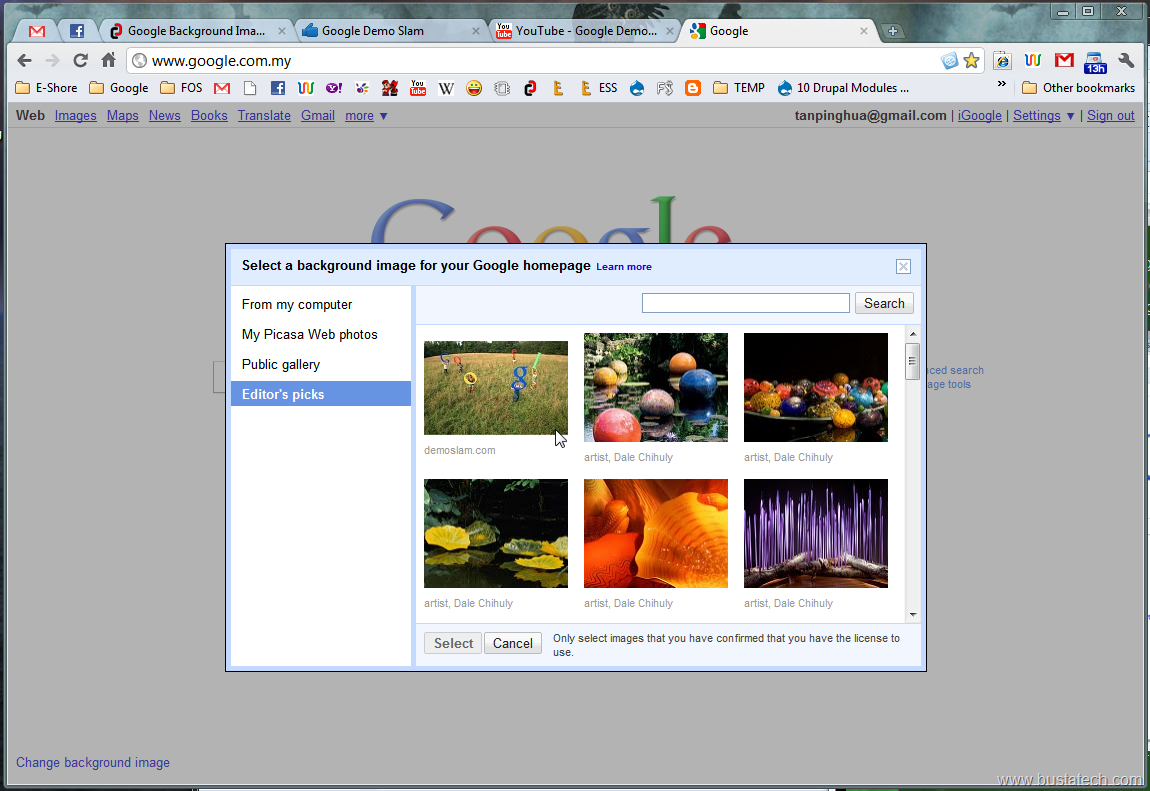
If you are interested to use the image they created in this video as your Google homepage background, you can select that image under Editor’s picks at the Select background image windows. Click on the Change background image at your Google homepage.
So, someone who is participating in the Google Demo Slam (more info here), create this very creative video on how they “steal” the Google logo from its homepage. Have a look at the video, for me, the idea is brilliant.
If you are interested to use the image they created in this video as your Google homepage background, you can select that image under Editor’s picks at the Select background image windows. Click on the Change background image at your Google homepage.
 Now go to Editor’s picks and choose the 1st image, the stealing logo image, and click Select.
 Then you should have some guys running away stealing your Google logo at your Google homepage.
 If you like their idea, don’t forget to vote for that idea at Google Demo Slam. At the Demo Slam homepage, choose the video you like and click on the Choose me.
 Have Fun!
I can’t find whis photo((((( Where I can find it now?
They might have taken it down. I have 2 accounts, ad I made the first one a couple years ago, and after watching demo slam, I put my background as the stealing the google logo. I made my second one this year,and because I really like the pic, I wanted to change to that, but I can’t find it.